> For the complete documentation index, see [llms.txt](https://docs.web3forms.com/llms.txt). Markdown versions of documentation pages are available by appending `.md` to page URLs; this page is available as [Markdown](https://docs.web3forms.com/getting-started/integrations/telegram-notifications.md).
# Telegram
Get instant notifications in your Telegram chat or group whenever someone submits a form on your website. Perfect for staying updated on the go and responding to inquiries quickly.
{% hint style="info" %}
This is a **PRO feature**. You must have an active PRO plan subscription to use this integration.
{% endhint %}
## Features
* ✅ **Instant Notifications**: Receive form submissions in real-time
* ✅ **Personal or Group Chats**: Send to your private chat or team groups
* ✅ **Formatted Messages**: Clean, readable message formatting
* ✅ **Mobile & Desktop**: Works on all Telegram platforms
* ✅ **No Coding Required**: Simple setup with just a Chat ID
## Setup Instructions
### Step 1: Get Your Chat ID
To receive notifications, you need to get your Telegram Chat ID:
1. Open Telegram on your phone or desktop
2. Search for **@web3forms\_bot** in Telegram
3. Start a chat with the bot
4. Send the `/start` command
5. The bot will reply with your **Chat ID** (a number like `123456789`)
6. Copy this Chat ID for the next step
{% hint style="info" %}
**For Group Chats**: Add @web3forms\_bot to your group and send `/start` to get the group's Chat ID.
{% endhint %}
### Step 2: Access the Integrations Tab
1. Log in to your [Web3Forms Dashboard](https://app.web3forms.com)
2. Select the form you want to connect
3. Navigate to the **Integrations** tab in your form settings
### Step 3: Enable Telegram Integration
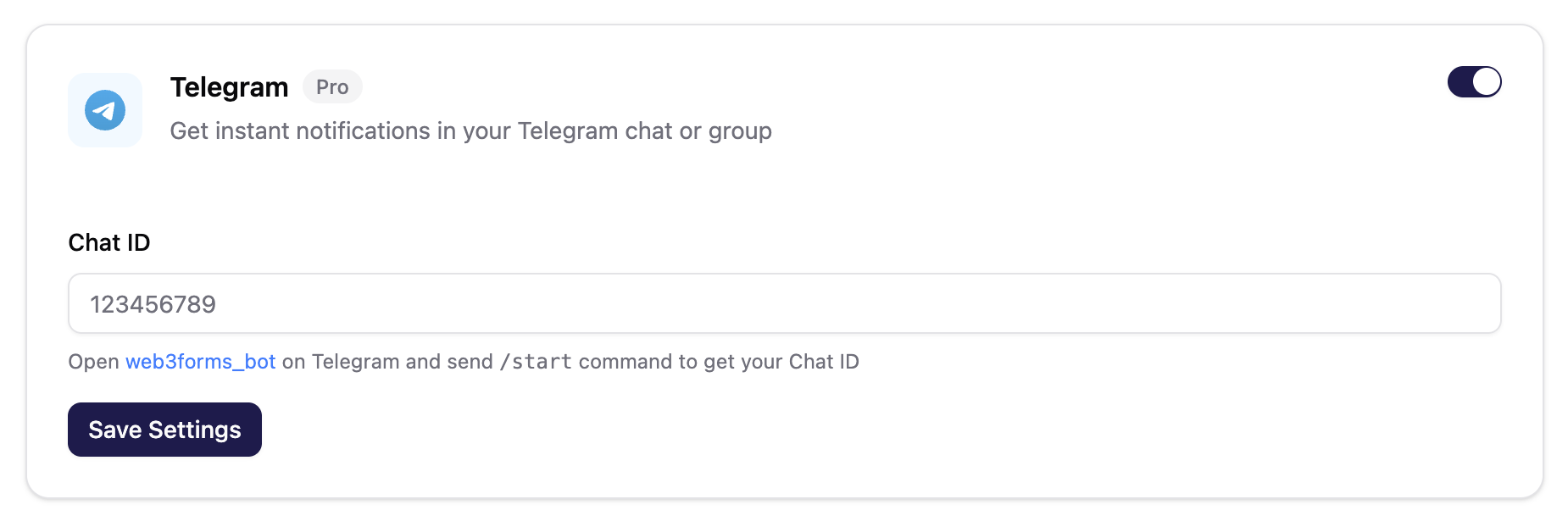
1. Find the **Telegram** integration card
2. Toggle the switch to enable the integration
3. Paste your Chat ID in the **Chat ID** field
4. Click the **Save Settings** button
## How It Works
1. When a user submits your Web3Forms contact form, the data is processed
2. Web3Forms sends a formatted notification to your Telegram chat
3. You receive the message instantly on all your Telegram devices
## Managing Your Integration
### Update Chat ID
To change the destination chat:
1. Get a new Chat ID from @web3forms\_bot
2. Go to your form's Integrations tab
3. Update the Chat ID field
4. Click **Save Settings**
### Disable Notifications
To stop receiving Telegram notifications:
1. Go to your form's Integrations tab
2. Toggle the Telegram switch off
3. Your settings will be saved automatically
## Troubleshooting
### Not Receiving Notifications
If you're not receiving Telegram notifications:
* **Verify Chat ID**: Make sure the Chat ID is correct (it should be a number)
* **Check Integration Status**: Ensure the toggle is enabled
* **Test the Bot**: Send `/start` to @web3forms\_bot again to verify it's working
* **Check Spam/Blocked**: Make sure you haven't blocked the bot
* **Test Your Form**: Submit a test entry and wait a few seconds
### Group Notifications Not Working
For group chats:
1. Ensure @web3forms\_bot is added to the group
2. The bot must not be removed from the group
3. Use the group's Chat ID, not your personal Chat ID
4. Make sure the group allows bots to send messages
### Wrong Chat ID
If you entered the wrong Chat ID:
* You won't receive any notifications
* Simply update the Chat ID with the correct one
* No data is lost; future submissions will be sent to the new chat
## Advanced Tips
### Using with Groups
Set up a dedicated Telegram group for form submissions:
1. Create a new Telegram group
2. Add @web3forms\_bot to the group
3. Add your team members
4. Send `/start` to get the group Chat ID
5. Use this Chat ID in your Web3Forms integration
## Related Integrations
* [Slack Integration](/getting-started/integrations/slack.md) - Team notifications in Slack
* [Discord Integration](/getting-started/integrations/discord.md) - Notifications in Discord
* [Webhook Integration](/getting-started/pro-features/webhooks.md) - Custom endpoints
---
# Agent Instructions
This documentation is published with GitBook. GitBook is the documentation platform designed so that both humans and AI agents can read, navigate, and reason over technical content effectively. Learn more at gitbook.com.
## Querying This Documentation
If you need additional information that is not directly available in this page, you can query the documentation by asking a question.
Perform an HTTP GET request on the following URL with the `ask` and `goal` query parameters:
```
GET https://docs.web3forms.com/getting-started/integrations/telegram-notifications.md?ask=&goal=
```
`ask` is the immediate question: it should be specific, self-contained, and written in natural language.
`goal` is what the user is ultimately trying to achieve, the reason they need the answer. Sharing it helps GitBook give you a better, more relevant answer. A goal is most helpful when it describes the outcome the user wants rather than restating the question. For example, with `ask=how do I create an API token`, a goal like `automate deployments from our CI pipeline` lets GitBook tailor the answer to that use case.
The response will contain a direct answer to the question and relevant excerpts and sources from the documentation.
Use this mechanism when the answer is not explicitly present in the current page, you need clarification or additional context, or you want to retrieve related documentation sections.